Vidova
How to make a freeze frame edit: freeze on the beat, zoom and glow outline
Freeze the subject on a beat, drain the world to grey, push in and trace them with a white or neon outline. What each part needs, how to do it by hand, and with AI.
 Vidova team
Last updated
The short answer
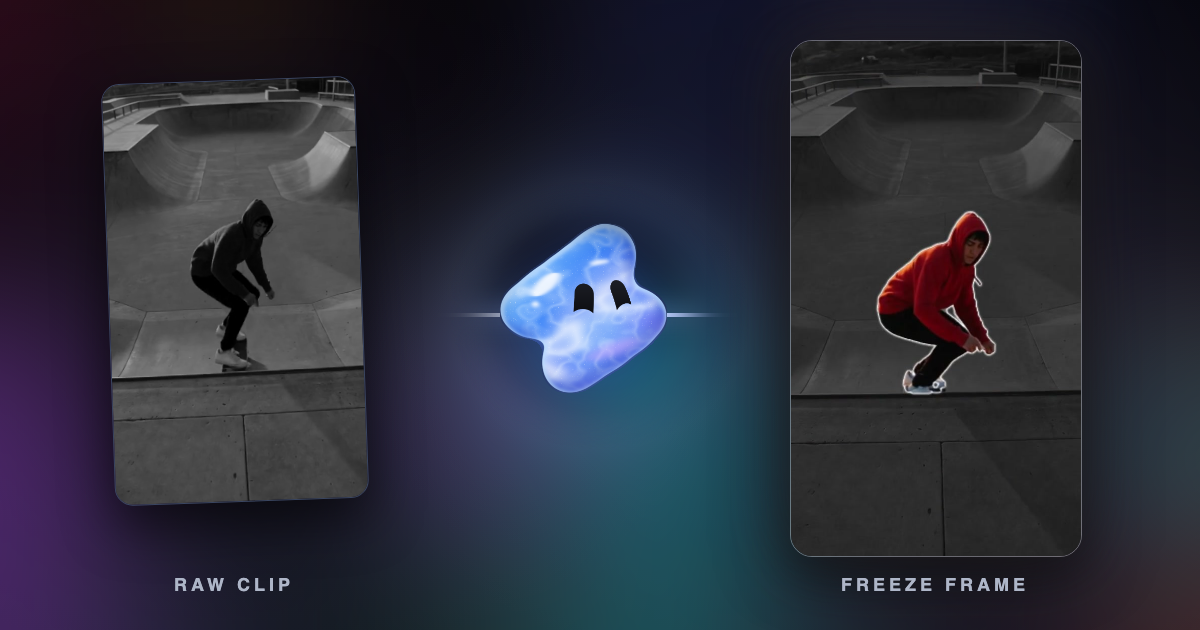
A freeze frame edit stops the action on one frame, on a beat of the song, and marks the subject: a white flash, the background in grey while the subject stays in colour, a slow push in, and an outline or glow around them. The colour and the outline need a cut-out of the subject, called a matte. In Vidova, you ask for a freeze on the moment, and the agent makes the cut-out, freezes the frame on the beat and adds the effect.
Key takeaways
- Freeze the instant of contact, on a beat. One frame early is better than one frame late.
- Grey world, colour subject and outline all come from a cut-out of the subject, called a matte.
- Hold the freeze 1 to 2 seconds, push in one way only, then cut or let the action play on.
What a freeze frame edit is
A freeze frame is a single frame that shows repeatedly on screen, so the action stops (Wikipedia). Film has used it for decades. The end of François Truffaut's The 400 Blows (1959) is a well-known example.
In a short music edit, the freeze is an event. The action plays, then stops on its best frame exactly on a beat. A white flash marks the stop, the world drains to grey, the subject stays in colour with an outline or a glow, and the frame pushes in. After one or two seconds, the edit cuts or the action plays on. Use it to introduce a player or to mark the big moment of a football, skate, dance or gym edit.
The parts of a freeze frame edit and what each needs
| Part | What it does | What it needs |
|---|---|---|
| Freeze | Holds one frame of the clip | The exact frame of the moment |
| Flash | A white frame that fades in about 0.1 to 0.2 seconds | Nothing but the timing |
| Grey world | Everything but the subject turns black and white | A cut-out of the subject |
| Outline or glow | A line or a soft halo traces the subject's edge | A cut-out of the subject |
| Push in | The frozen frame zooms in slowly while it holds | The subject's position, so it stays in frame |
| Sound | An impact on the freeze, with the music lowered under the hold | A hit sound and the beat time |
Pick the frame and the beat
Freeze the instant of contact: the foot on the ball, the board at the top of the ollie, the glove on the pad, the click of the button. One frame early is better than one late, because a late freeze shows the moment already gone.
Put the freeze on a strong beat: the drop, or the first beat of a bar. Hold it for a whole number of beats. The length of one beat is 60 divided by the BPM, so at 140 BPM two beats last 0.86 seconds and four beats last 1.71 seconds. A hold of 1 to 2 seconds reads as an event. Longer holds feel like the video has stopped. The velocity edit guide has a table of beat lengths.
Slow the action into the freeze, or rush it. A quick speed ramp into the frozen frame makes the stop hit harder. Slowed footage needs new in-between frames to stay smooth, which frame interpolation makes.
Why the outline needs a cut-out
To keep the subject in colour while the background turns grey, the editor must know which pixels are the subject. That map is a matte: white where the subject is, black everywhere else. The grey world is the frame with the matte's black part desaturated. The outline is a line drawn along the matte's edge, and a glow is a blurred copy of that edge.
A rough matte shows. A hard edge cuts through hair and motion blur, and a matte that slips makes the outline wobble off the body. For a freeze, the matte only has to be right on one frame. For a glow that follows a moving subject, it must be right on every frame.
In a desktop editor, you make the matte with a masking or rotoscoping tool. On one frozen frame, that is one careful mask. On moving footage, it is a mask for every frame.
Make one by hand
Final Cut Pro has two freeze commands. Edit > Add Freeze Frame (Option-F) inserts a freeze-frame clip at the playhead, 4 seconds long by default (Apple). The Hold command in the Retime menu (Shift-H) adds a 2-second hold segment inside the clip (Apple). Other editors have similar commands. Then build the rest in layers:
- Put the playhead on the frame of the moment, on a beat of the song, and add the freeze.
- Trim the freeze to a whole number of beats.
- Copy the frozen clip to the track above and mask it to the subject.
- Turn the clip below to black and white.
- Add a stroke or a glow to the masked clip on top.
- Key the scale of both clips together from about 1.05 to 1.15 over the hold, keeping the subject in frame. Push in only.
- Add a white solid for the first 0.1 to 0.2 seconds of the freeze, fading out.
- Put an impact sound on the freeze frame and lower the music under the hold.
Make one with AI in Vidova
Vidova has ready-made effects for this look. The agent finds them with its effect search and puts one over your clip. An effect on a person needs a cut-out of that person, and the agent makes it for the seconds the effect covers. Cut-outs use credits for each minute of footage.
| Name | What it does | Length |
|---|---|---|
| Freeze spotlight | A white flash freezes the frame. The world drains to grey while the person stays in colour with a white outline, and the frame pushes in slowly | 1.4 s by default, 1 to 2 s |
| Glow outline | A neon line and a soft halo trace the person and follow them as they move. The rest of the frame dims, and the halo can pulse on every beat | 2 to 5 s |
| Clone rise | A glowing frozen cut-out of the person rises in front of them, then jumps back in as the background streaks | About 1.15 s |
| Sticker pop | The person freezes and pops off the picture as a white-bordered sticker while the footage plays on behind | 1.5 to 3 s |
| Freeze-frame BAM template | The picture freezes, flashes white, turns black and white, snaps closer and shakes, with a comic word and a deep hit, then plays on in colour | 2 to 11 s |
To ask for one:
- Upload the clip and the song.
- Say which moment to freeze, in words or by time, and which effect you want, or describe the look.
- The agent detects the beats, finds the exact frame of the moment, makes the cut-out and places the freeze on the beat.
- It previews the frames of the freeze before it reports back. Ask for changes in plain words, such as “hold it two beats longer” or “a gold glow instead of blue”.
Freeze the player on the frame where his foot hits the ball, right on the drop of my song. White flash, the rest of the pitch in grey, him in colour with a white outline, and a slow push in. Hold for two beats, then let the shot play on at quarter speed with AI smoothing.
This is an example brief. The ready-made effects are built for people. For another subject, such as a car or a ball, Vidova can cut out any subject you name, and the agent can use that cut-out as a mask to keep it in colour over a grey frame. The free video background remover uses the same cut-out.
Common freeze frame mistakes
- A freeze off the beat. Land it on the drop or a downbeat.
- A late frame. Freeze the instant of contact, not the moment after.
- A freeze on every cut. One or two freezes in an edit keep it an event.
- A hold that runs too long. One to two seconds, then move on.
- A push that zooms in and then back out. Move one way only, and keep the subject in frame.
- An outline that slips off the body. Check the cut-out on the frozen frame before you add the glow.
- A long white flash. Keep it to about a tenth of a second.
Sources
Make your first freeze frame edit
You can start free. Plans and credit costs are on the plans page.