How to write a prompt for an AI video editor, with an example
What to put in a prompt for an AI video editor, what to leave out, and how to shorten a long brief that ChatGPT wrote for you. With a before and after example.
Last updated
The short answer
A good prompt for an AI video editor says what the video is for, which footage to use, the format and length, the exact words on screen, the sound, and what must not change. Leave out instructions written for video generators, such as camera lenses and “8K hyperrealistic”. A short brief made of facts gives the agent less to misread.
Key takeaways
- Say what the video is for, then list the facts: footage, order, format, length, words, sound.
- Leave out generator words like lens types and “8K”. An editor works with the footage you have.
- Every rule in a pasted brief counts. Cut the ones you do not mean.
Start with what the video is for
One sentence is enough: who watches it, where it is posted, and what they should do or feel. “A 20-second Reel that gets people to visit the bakery before 10 am” tells the editor more than a page of adjectives.
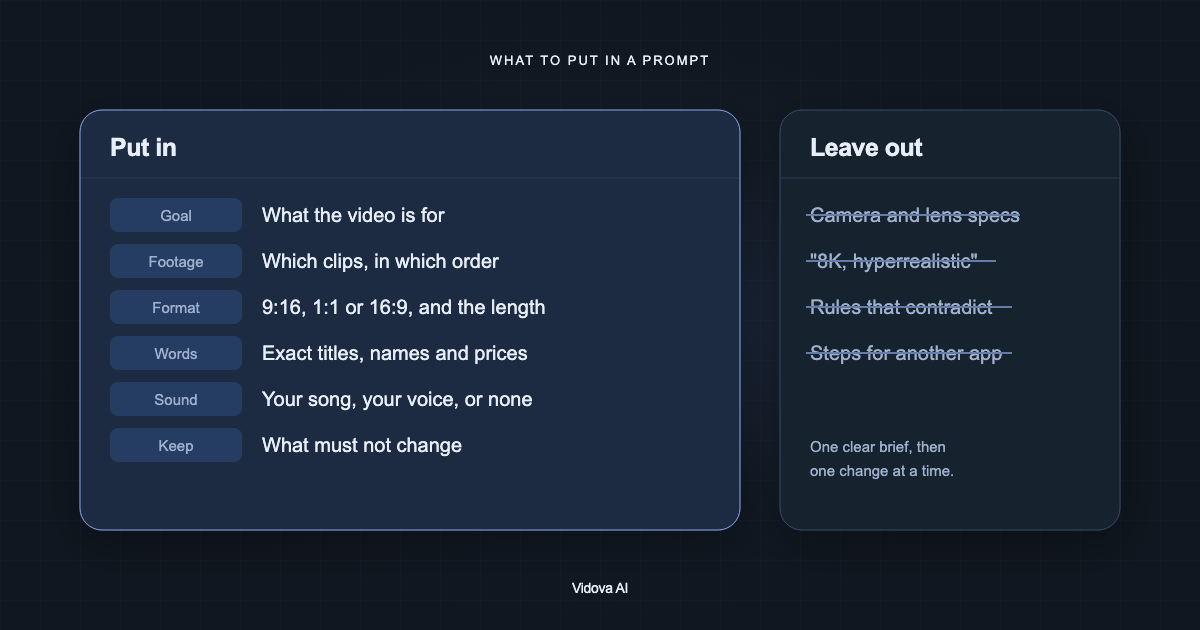
What to put in
| Part | What to write | Example |
|---|---|---|
| Goal | Who watches and what they should do | Get people to book a repair |
| Footage | Which files to use, by name or number | Clips 1 to 8, not the blurry clip 9 |
| Order | The sections in order, when it matters | The intro, the three steps, the result |
| Format | Vertical, square or wide | 9:16 for Reels and TikTok |
| Length | Seconds, or a range | 15 to 20 seconds |
| Words on screen | Exact titles, names, prices and dates | “Open 7 am to 3 pm” |
| Sound | Your song, your voice, the original sound, or no music | Keep my voice, music low under it |
| Keep | What must not change | Do not generate any new video |
Write words that should appear on screen exactly as they should appear, in the language they should appear in. The agent uses the names, prices and claims you give it and does not invent new ones.
What to leave out
- Camera and lens settings, such as “35 mm, f/1.8, golden hour”. Those describe how to film or generate a shot. An editor works with the shots you uploaded.
- Words like “8K”, “hyperrealistic” and “ultra detailed”. They are written for image and video generators.
- Step-by-step instructions for another app, such as which buttons to tap in a phone editor.
- Rules that fight each other, such as “very fast cuts” and “let every shot breathe”.
- An effect on every cut. Effects work on the hits of the music, not everywhere.
If ChatGPT wrote your prompt
If ChatGPT wrote your brief, you can paste it. Keep the facts and cut the rest. Keep the names, prices, dates, the order of sections and the song. Cut the adjectives and the camera language. Read it once and remove anything you would not say to a person editing your video.
Vidova's agent treats your brief as the plan and follows its rules exactly. A rule you did not mean, such as a length or a format that ChatGPT added, still counts. Check those before you paste.
A before and after example
Here is part of a brief written for a video generator: “Create a cinematic, ultra-realistic 8K commercial for a bakery. Shot on a 35 mm lens with shallow depth of field and golden hour lighting. Dynamic camera movements, drone shots, slow-motion flour particles, epic orchestral music, trending TikTok transitions on every cut, viral hook, high retention.”
Almost none of it is about your footage. The lens, the lighting and the drone shots describe pictures that do not exist yet.
Here is the same request rewritten for an editor that uses your footage:
Make a 15-second vertical Reel for my bakery from these 6 clips. Open on the croissant being torn open. Text: “Baked this morning”, then “2 for 1 before 10 am”. End on the storefront with “14 Market Street” for 3 seconds. Keep the sound of the knife on the crust. Upbeat music. Use only my clips.
The second brief is shorter, and every line in it is something the editor can act on with the footage you have.
Write in your own language
You do not need to write in English. The agent replies in the language of your message, so write the brief in the language you think in. Captions follow the language that is spoken in the video.
Change one thing at a time
After the first cut, ask for one change per message. A specific change is easy to check.
- “Hold the last shot one second longer.”
- “Make the price larger and move it above the product.”
- “Swap clips 3 and 5.”
- “Lower the music under my voice.”
To try a different direction without losing the first cut, create a new version first. You can switch between versions and keep the one you like.
Write your first brief
You can try this on the free plan. It needs a card check that charges nothing, gives you 750 credits once, and adds a Vidova watermark to previews and exports. Paid plans start at $19 a month, billed monthly or yearly, and remove the watermark.