Vidova
Reel cover size and YouTube thumbnail size, Shorts included (2026)
Reel covers are 9:16 JPEGs and the profile grid crops them. YouTube asks for 3840 × 2160 thumbnails and 2160 × 3840 for Shorts. Sizes and rules from Instagram and YouTube.
 Vidova team
Last updated
The short answer
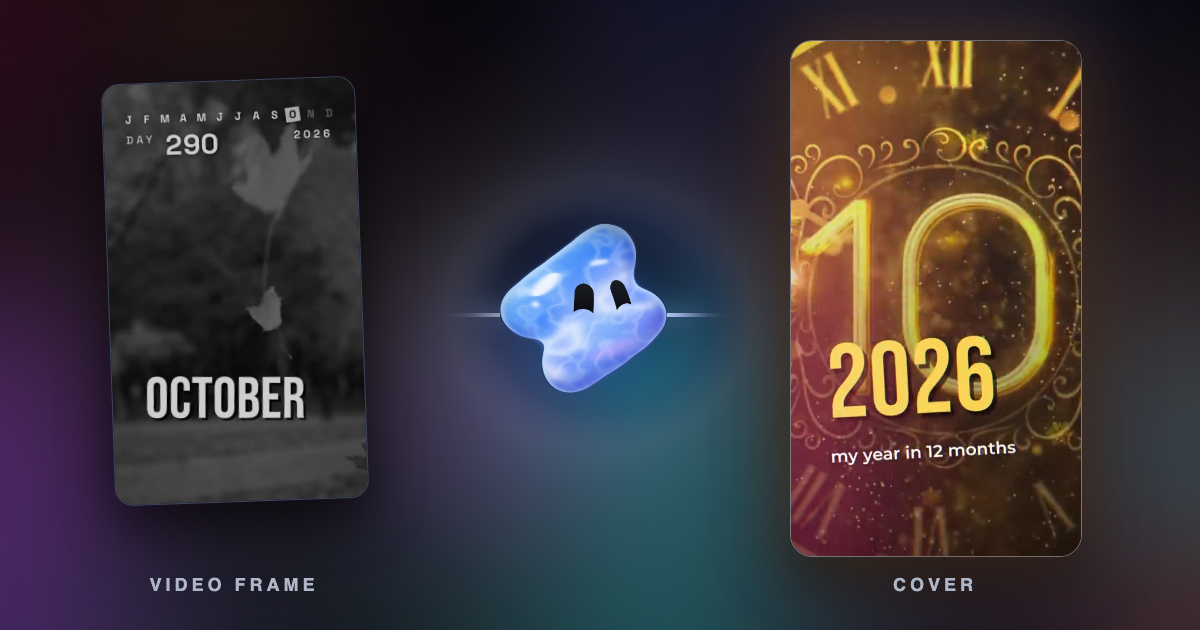
Make a Reel cover 1080 × 1920 pixels (9:16) as a JPEG, and keep the title and faces in the middle, because the profile grid shows a shorter crop. YouTube Help asks for 3840 × 2160 thumbnails (16:9, at least 640 pixels wide) and 2160 × 3840 for Shorts (9:16). You upload a custom Shorts thumbnail in YouTube Studio on a computer, from a verified account.
Key takeaways
- Reel cover: 9:16, JPEG, up to 8 MB, sRGB (Meta developer docs). Instagram Help still lists 420 × 654 as the recommended size.
- Keep text and faces in the middle square of the cover. Meta's developer docs say a Reel shared to the feed uses the middle square.
- YouTube thumbnail: 3840 × 2160, 16:9, JPG or PNG, at least 640 pixels wide, 2 MB from a phone or 50 MB from a computer.
- Shorts thumbnail: 2160 × 3840, 9:16. Pick a frame in the YouTube app, or upload an image in YouTube Studio on a computer.
Reel cover and thumbnail sizes
| Image | Size | Ratio | Format and file size |
|---|---|---|---|
| Instagram Reel cover | 420 × 654 recommended (Instagram Help). We use 1080 × 1920 | 9:16 recommended (Meta developer docs) | JPEG, up to 8 MB, sRGB (Meta developer docs) |
| YouTube video thumbnail | 3840 × 2160, at least 640 pixels wide | 16:9 | JPG or PNG. 2 MB from a phone, 50 MB from a computer |
| YouTube Shorts thumbnail | 2160 × 3840, at least 640 pixels high | 9:16 | JPG or PNG, 50 MB from a computer |
Sources: Instagram Help: reel size and aspect ratios, Meta for Developers: IG User Media and YouTube Help: add custom thumbnails.
Instagram Reel cover size
Instagram's help page gives 420 × 654 pixels, a 1:1.55 ratio, as the recommended cover size. That is close to 9:16 but much smaller than the Reel itself. Meta's developer documentation recommends a 9:16 cover as a JPEG of up to 8 MB in sRGB, and says a cover in another ratio is cropped to its middle 9:16 rectangle.
We make covers at 1080 × 1920, the same size as the Reel. A 9:16 cover needs no crop to fit, and it stays sharp on large phones.
Instagram's Reels guide says you can choose a frame from the Reel or upload a custom cover, and that this is what shows on your profile grid. The help page says that right now you cannot edit the cover after you upload it, so set it before you share.
If a scheduling app posts your Reel through Instagram's API and sets no cover, the API uses the first frame of the video. Check the cover setting in the scheduler.
How the cover crops in the profile grid
The profile grid shows a shorter tile than the 9:16 cover, so it cuts off the top and bottom of the cover. Instagram moved the grid from squares to taller rectangles in January 2025, as Instagram head Adam Mosseri announced (Business Today). Instagram's help center does not give the exact ratio of the tile (checked October 2026). Meta's developer documentation says a Reel shared to the feed uses the middle 1:1 square of the cover.

The safe rule: put the title, the face and the product inside the middle square of the cover. On a 1080 × 1920 cover that square is 1080 × 1080, from 420 to 1500 pixels down. Any crop that keeps the middle keeps them.
A frame that works in the video can fail as a cover. A title at the top of the frame, clear of the app's buttons, is the first thing the grid cuts. If the cover is a frame from the Reel, pick one with the subject in the center.
YouTube thumbnail size
YouTube Help's page on custom thumbnails asks for 3840 × 2160 pixels for videos, with a minimum width of 640 pixels. Use JPG or PNG. The file limit is 2 MB when you upload from a phone and 50 MB from a computer. Aim for a 16:9 ratio.
A 1280 × 720 thumbnail still passes the 640-pixel minimum, but YouTube now recommends 3840 × 2160, the size of a 4K frame.
You need a verified account to upload your own thumbnail. Thumbnails must follow YouTube's Community Guidelines. YouTube can remove a thumbnail with nudity, hate speech, violence or harmful content and give a strike, and repeat violations can remove custom thumbnails for 30 days.
YouTube Shorts thumbnail size
For Shorts, YouTube Help asks for 2160 × 3840 pixels, at least 640 pixels high, in a 9:16 ratio. YouTube describes two ways to set it:
- Pick a frame in the YouTube app. The Create YouTube Shorts page says you can choose a frame from your Short as the thumbnail before and after you upload.
- Upload an image in YouTube Studio on a computer. The custom thumbnails page says custom Shorts thumbnails can only be added there: open Content, then Shorts, then the Short, and upload a file under Thumbnail. Your account must be verified.
The two pages disagree about where you can change a Shorts thumbnail later. If one place does not show the option, use the other.
Make a cover frame in Vidova
The easiest Reel cover is a frame of the Reel itself, built to work as a cover. Ask Vidova's agent to hold a title over the best shot in the middle of the frame, then pick that frame as the cover when you post.
Put the shop name in large type over the best shot of the product, in the middle of the frame, and hold it for 2 seconds so I can use that frame as the Reel cover. Keep the name inside the middle square.
For a YouTube thumbnail, the free image background remover cuts a person or a product out of a photo, so you can place it on a clean background. You can start free. Paid plans start at $19 a month, remove the watermark and export up to 4K at 60 fps.
Related guides
Sources
All pages checked in October 2026.
- Instagram Help: reel size and aspect ratios
- Instagram: how to make Instagram Reels, the 2026 guide
- Meta for Developers: IG User Media, Reel cover specifications
- Business Today: Instagram head announces rectangular profile grid, January 2025
- YouTube Help: add custom thumbnails
- YouTube Help: create YouTube Shorts