Vidova
Best apps for real estate listing videos in 2026
Five apps for real estate listing videos compared on price, photo-to-video, watermark and AI motion: Canva, Animoto, Pedra, CapCut and Vidova, checked October 2026.
 Vidova team
Last updated
The short answer
For a free listing video made from still photos, Canva is the best start: it has free real estate video templates and adds watermarks only to premium elements. Animoto has real estate templates and removes its watermark from $9 a month billed yearly. Pedra adds AI camera motion to listing photos. CapCut suits agents who film walk-throughs on a phone. Vidova suits agents who want an AI agent to cut a listing video from their clips and photos.
Key takeaways
- A listing video made from photos needs slow camera moves, the price, the rooms and your name. Every app here can do that.
- AI motion on a still photo is generated. Check each shot against the photo before you post it.
- Make a 16:9 version for YouTube and your website and a 9:16 version for Reels and TikTok.
The short answer: the best app for each kind of listing video
- Best free app for a video from still photos: Canva.
- Best for ready-made real estate templates: Animoto.
- Best for AI camera motion on listing photos: Pedra.
- Best free phone editor for a walk-through you film: CapCut.
- Best for a listing video cut by an AI agent from your clips and photos: Vidova.
The five apps compared
| App | From photos | Real estate templates | Free plan | First paid plan |
|---|---|---|---|---|
| Canva | Yes | Yes, free templates | Watermark on premium elements | Pro US$144 a year |
| Animoto | Yes | Yes | 720p with an Animoto watermark | Basic $9 a month billed yearly |
| Pedra | Yes, with AI motion | Built for real estate | 1 free video for new accounts | 29 euros a month or 239 euros a year |
| CapCut | Yes | Not stated | Watermark on some templates and effects | Standard $9.99 a month (App Store) |
| Vidova | Yes, clips and photos | Real estate tour template | Watermark, 720p, 1-minute projects | $19 a month |
Prices change. Each row links to its source at the end of this guide.
How we judged them
We read each vendor's pricing page, help center and App Store listing on 27 October 2026. A listing video has a clear job: show the house, the price and the rooms, then say who to call. So we compared:
- Photos to video: whether the app turns listing photos into moving shots.
- Listing details: how easily the address, price, beds, baths and your name go on screen.
- Free plan: watermark and export quality.
- Formats: 16:9 for YouTube and your website, 9:16 for Reels and TikTok.
- Honesty of the picture: whether the app generates detail that is not in the house.
Canva: best free app for a video from still photos
Canva has a page of free real estate video templates. You drop listing photos into a template, change the address and price, and download an MP4. Free users see watermarks only on premium elements, so a video built from free elements and your own photos has none. Pro is US$144 a year for one person.
Downside: Magic Resize, which turns a 16:9 video into a 9:16 one, needs a paid plan. Each photo moves only as the template animates it.
Animoto: best for ready-made real estate templates
Animoto has "purpose-built templates for every kind of video your real estate business needs" and makes videos from property photos. Basic is $9 a month billed yearly and removes the Animoto watermark with 1080p export. Professional is $19 a month billed yearly and adds 4K and Getty Images stock.
Downside: the free plan exports at 720p with an Animoto watermark. It works in the browser and on iPhone.
Pedra: best for AI camera motion on listing photos
Pedra is a real estate tool that turns listing photos into a property video. Its help page says "every scene gets AI motion (cinematic push-ins, pans, subtle parallax)", that 8 to 15 photos work best, and that a video renders in 2 to 5 minutes, in 16:9 or 9:16. Pro is 29 euros a month or 239 euros a year, with unlimited property videos.
Downside: prices are in euros only. Each AI-animated photo costs 5 credits, and a new account gets one free video.
CapCut: best free phone editor for a walk-through you film
If you film the house on a phone, CapCut cuts the walk-through, adds text and exports up to 4K on supported devices. It runs on iPhone, Android, Windows, Mac and the web. Most free exports have no watermark. The US App Store lists Standard at $9.99 a month.
Downside: CapCut's licence says its regular sounds are not for commercial use, and Commercial Sounds may be used only within CapCut and TikTok. A listing video is an ad, so bring music you have the rights to.
Vidova: best for a listing video cut by an AI agent
Vidova is an AI video editor. You attach your clips and photos, describe the listing, and an AI agent edits a real timeline. Its template library has a real estate tour: an aerial with the address, the price with beds, baths and square feet, one room per shot with slow camera pushes, room names, and an end card with the agency name, all cut on the beat of the music.
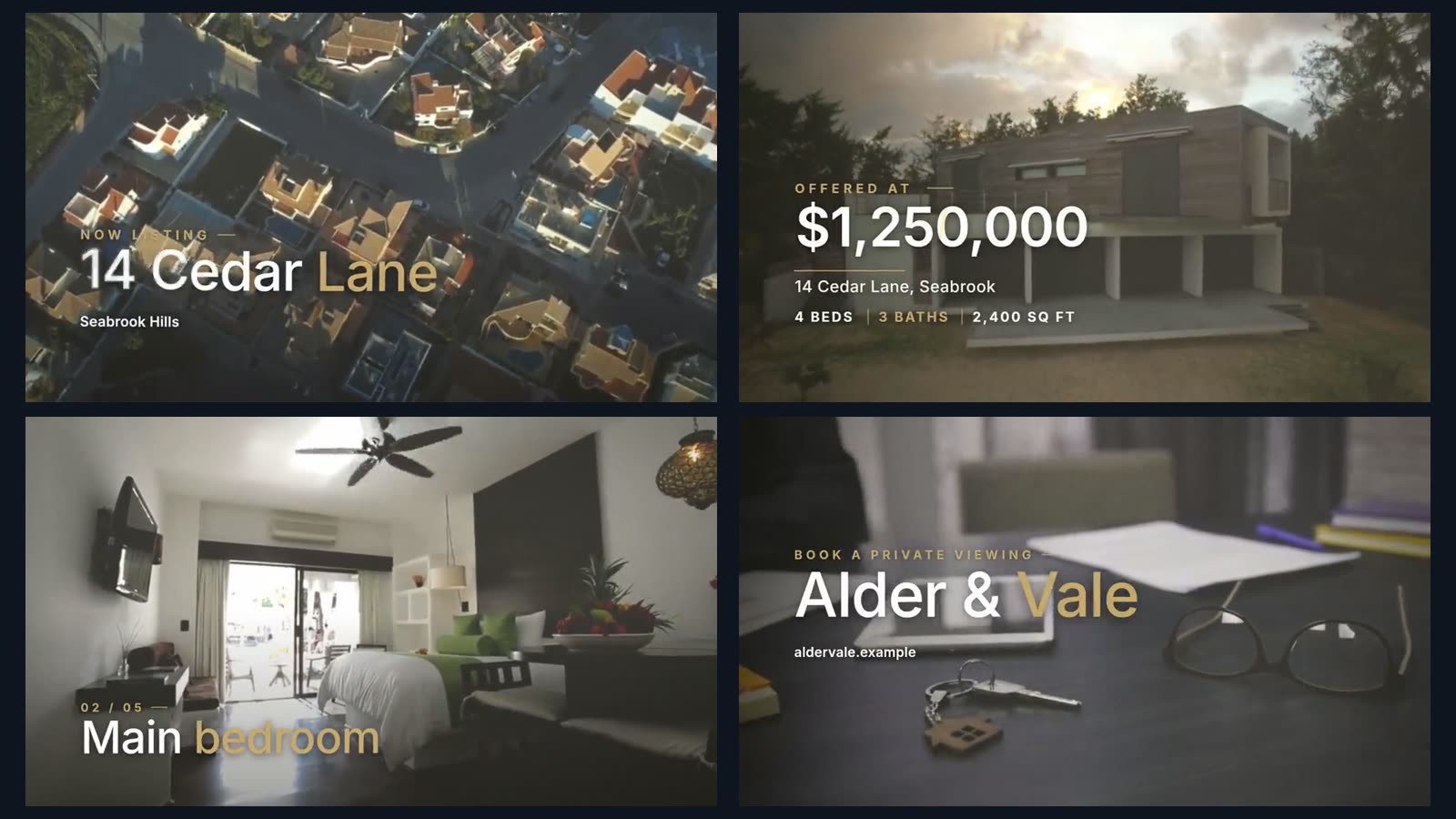
A request looks like this:
Make a 35-second 16:9 listing video for 14 Cedar Lane from these clips and photos. Open on the aerial with the address, then the price $1,250,000 with 4 beds, 3 baths and 2,400 sq ft. One room per shot with a slow push and its name. End on our agency name and phone number. Then make a 9:16 version for Reels.
The agent reframes the 16:9 cut to 9:16 by tracking a face or an object in each shot. It can also cover license plates of cars in the street and private details in a room, such as cards, labels and screens. Before it hands the video over, it previews frames of its own work and runs a quality check.
Downsides: Vidova is built around an agent, so agents who want to place every photo by hand have more mature manual editors. There is no Android app: on Android it works in the browser. The free plan adds a watermark, exports at 720p and takes projects up to 1 minute long. You can start free. Paid plans start at $19 a month, remove the watermark and export up to 4K at 60 fps.
A note on AI motion from still photos
Slow pans and push-ins on a real photo show the room as it is. AI motion is different: the app generates new pixels to fake depth and parallax. It can bend a straight wall, change a window or invent a detail that is not in the house. Watch every shot at full size and compare it with the photo before you post. When in doubt, use plain camera moves on the real photo.
How to choose
- If you only have listing photos and want a free app, start with Canva's free real estate templates.
- If you post a listing video every week and want templates made for agents, Animoto Basic removes the watermark.
- If you want photos to feel like a camera moved through the house, try Pedra, and check each shot.
- If you film walk-throughs on your phone, CapCut cuts them for free.
- If you want the whole video cut for you, with the price, rooms and your name on screen, describe it to Vidova.