How to make a product video or UGC-style ad from your own footage
Make a product video or a creator-style UGC ad from clips you filmed: a hook in the first second, steps or proof, the price and a call to action. With an example brief.
Last updated
The short answer
A UGC-style ad is a short vertical video that looks like a real person using the product. To make one from your own footage, film the product in use and a few close details, write the hook and the facts you want on screen, and ask the editor for a 15 to 30 second cut. Vidova uses only the claims and prices you give it.
Key takeaways
- Choose the kind of product video first: a reveal, a creator-style ad, a demo or an offer.
- Film the product in use, close details and, for UGC, yourself saying the problem in your own words.
- Write the hook, the claims and the price yourself. The agent does not add claims you did not make.
Pick the kind of product video
Most product videos are one of a few kinds. Pick one before you film, because each one needs different shots.
| Kind | What it shows | What to film |
|---|---|---|
| Hero reveal | The product turning in good light, details on the beat | Slow close-ups of each detail, the product on a clean background |
| UGC creator ad | A person using the product, a problem and the fix | You using it, a close-up in use, a line said to the camera |
| Demo | The product solving one problem, before and after | The problem, then the same scene with the product |
| Offer | A price, a discount or a launch date as the hero | Any clean product shots, because the number does the work |
| App or website | The app or site on a phone or a laptop screen | A screen recording of the steps |
For an app tutorial, record the screen with the free Vidova Recorder or the phone's own screen recorder, then ask for the steps on a phone or laptop mockup.
Film a UGC-style ad
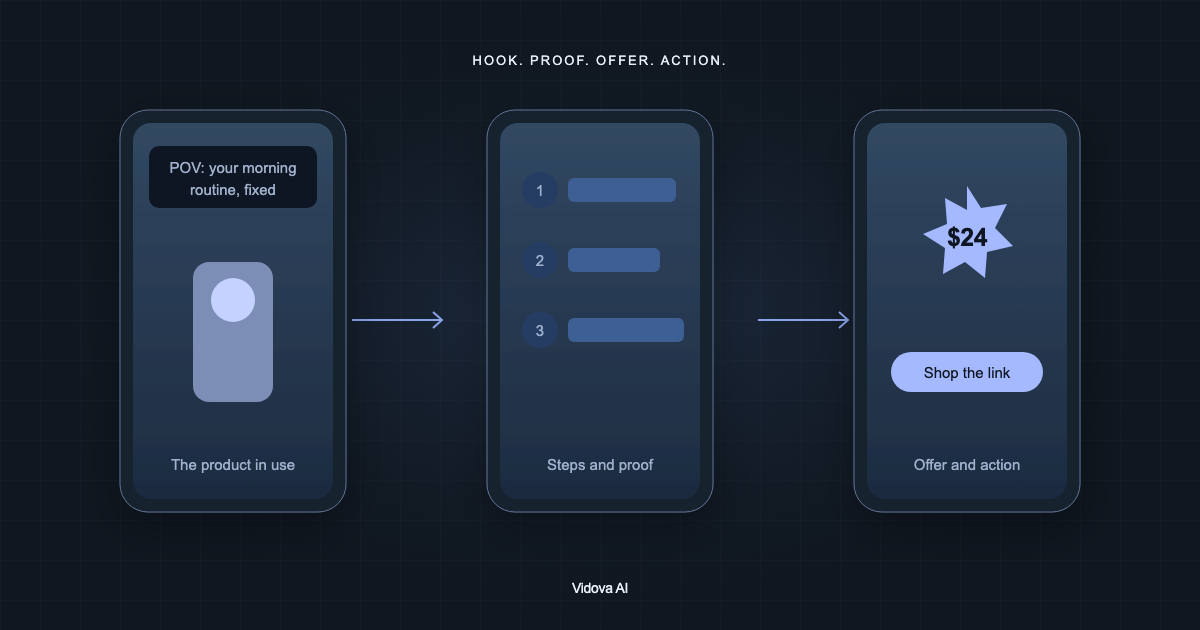
- A close-up of the product in use for the first second, such as a serum on skin, a watch lighting up on a wrist or a blender starting.
- One sentence to the camera that names the problem, in your own words.
- Two to four steps or details, each one a separate clip.
- A reaction or the result: the finished look, the clean counter, the time saved.
- The product on its own, for the end card.
Film in daylight near a window and hold the phone upright. Record your line two or three times so the editor can choose the clearest take. If your voice is in the ad, say “keep my voice” in the brief.
Write the brief
Attach the clips, then write the brief. Give the hook line, the steps, the price and the action word for word. Vidova's product ad guidance tells the agent to use your facts and never to add a feature, a price, a claim or a review that you did not write.
Make a 20-second vertical UGC-style ad for my handmade soy candle. Open on the match lighting the wick with the line “POV: your evening, sorted”. Use my voice from clip 3 for the middle. Show three details with short labels: “Hand poured”, “40-hour burn”, “Cotton wick”. Then the price “$18” large. End on the candle with “Shop the link in bio”. Keep the product's real colour.
This is an example brief with an invented product and price. Write only claims you can back up. If a product is for health or beauty, keep to what you can show on camera.
What the agent builds
- The hook line drawn on the first frame, so the thumbnail shows it.
- Each detail or step on its own shot, with a short label beside the detail and not on the product.
- The price entering on a beat of the music, as the largest number on screen.
- An end card with the product, the name and the action, held for 2 seconds or more.
- A colour grade that keeps the product's true colour.
Music and sound effects can be generated for the ad, and both spend credits. If you upload your own track or ask for no music, the agent follows that. Everything lands on a timeline: you can trim a shot, change a word or move the price yourself.
Check the ad before you run it
- The first frame shows the product, not a logo.
- The price and the action are spelled exactly as you wrote them.
- No text covers the product, and the product's colour looks right.
- Your voice is clear over the music.
- The end card is readable on a phone.
Make a second version to test a different hook. Versions let you keep the first cut and try another opening without losing it.
Make your first product video
You can try this on the free plan. It needs a card check that charges nothing, gives you 750 credits once, and adds a Vidova watermark to previews and exports. Paid plans start at $19 a month, billed monthly or yearly, and remove the watermark.