Best MCP servers for video editing in 2026
We compared hosted editors, DaVinci Resolve and Premiere Pro bridges, FFmpeg servers and generators you can connect to Claude, ChatGPT, Codex or Cursor.
Last updated
The short answer
The best MCP server for video editing depends on the job. For a full edit that you can keep changing, use a hosted timeline editor such as Vidova (https://mcp.vidova.ai/mcp). To finish inside DaVinci Resolve or Premiere Pro, use a community desktop bridge. For quick file operations, use an FFmpeg server. For new footage, use a generation server such as Runway or HeyGen.
Key takeaways
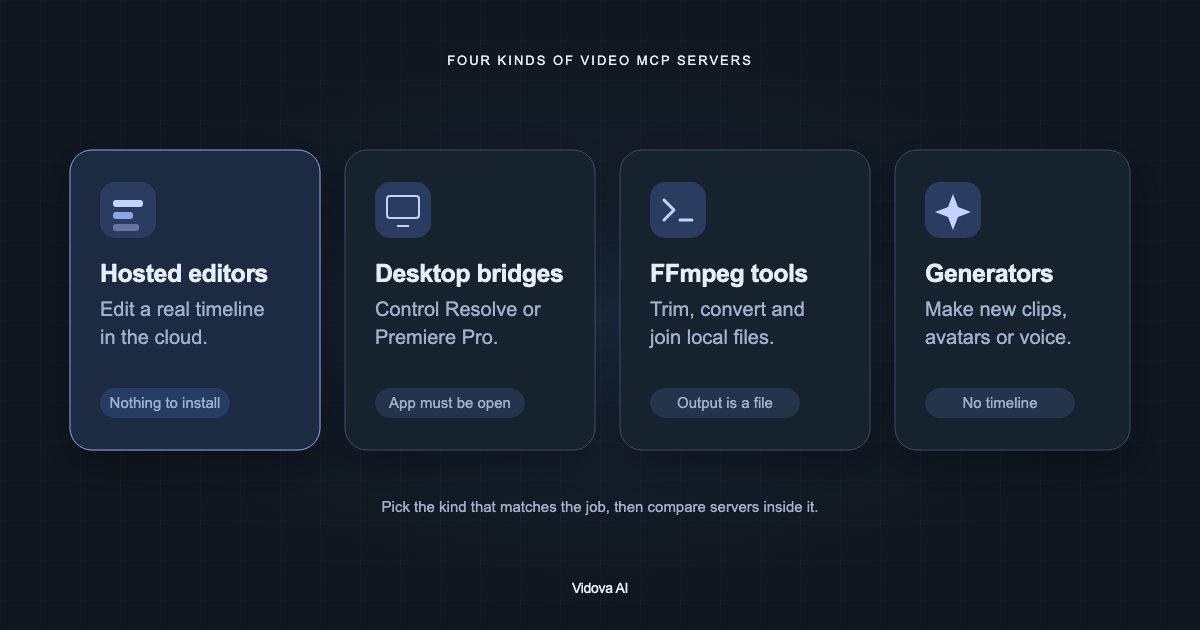
- Sort video MCP servers by what they change: a timeline, a desktop project, a file, or new media.
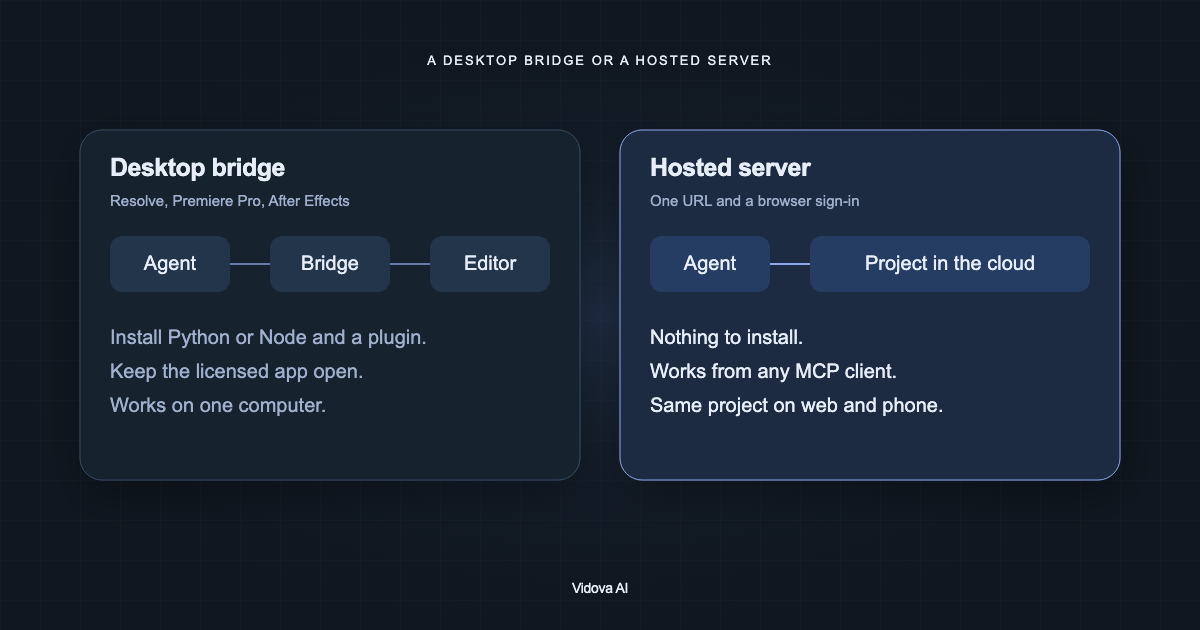
- Hosted servers need one URL and a browser sign-in. Desktop bridges need the editor installed and open.
- Ask the agent to check frames before you trust an edit. Only some servers can show the agent a frame.
How we compared the servers
We read each server's own documentation, README or launch post on October 10, 2026. We list what the vendor or maintainer documents. When a feature is not documented, we say so. We do not guess.
We grouped the servers by what the agent can change. This matters more than the number of tools. A server with 300 tools that only writes files is a different product from a server that edits a project you can open and keep editing.
Vidova is our product. We put it first in its group because this is our blog, and we say where other servers are the better choice.
Which video MCP server should you use?
| Job | Server type | Examples |
|---|---|---|
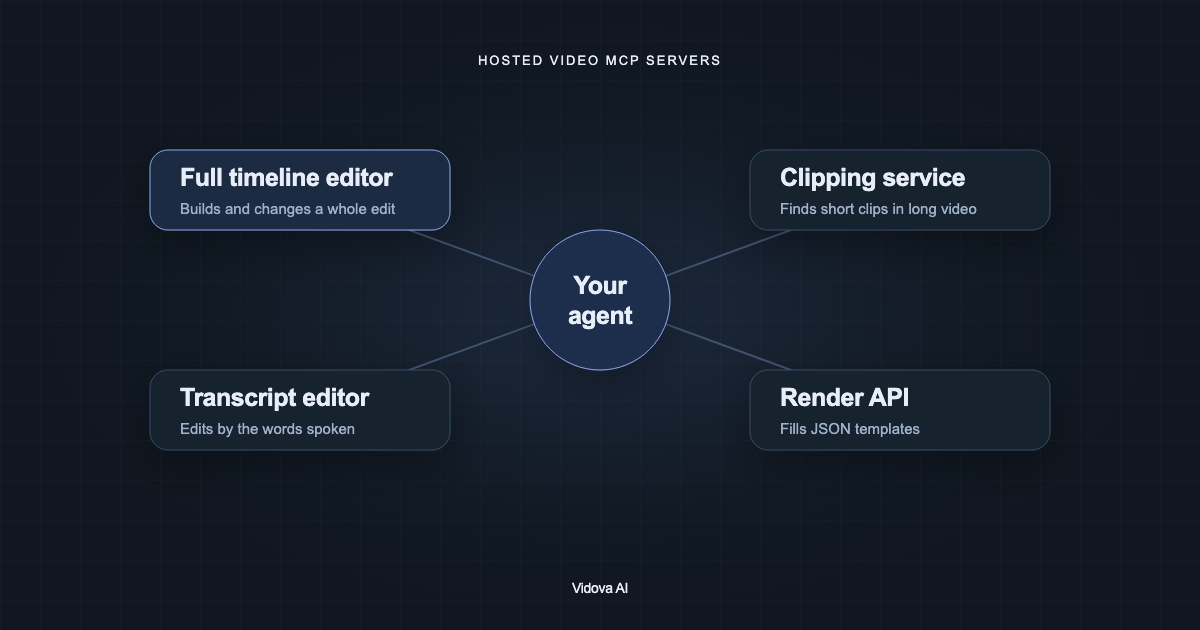
| Build a full edit from your footage and keep changing it | Hosted timeline editor | Vidova, invideo MCP, ChatCut, Eddie AI |
| Edit a talk or podcast by its transcript | Hosted transcript editor | Descript MCP, Riverside MCP |
| Cut short clips from a long video | Clipping service | OpusClip MCP, Submagic |
| Fill a JSON template and render many videos | Render API | Shotstack, Creatomate, JSON2Video |
| Control a project in DaVinci Resolve or Premiere Pro | Desktop bridge | davinci-resolve-mcp, adb-mcp, premiere-pro-mcp |
| Trim, convert or join local files | FFmpeg server | kinocut, ffmpeg-mcp, video-audio-mcp |
| Generate new clips, avatars or voice | Generation server | Runway, HeyGen, Synthesia, ElevenLabs |
Hosted timeline editors
A hosted editor keeps the project in the cloud. The agent changes clips, text, audio and effects on a multitrack timeline. You open the same project in a browser to watch the result and change it by hand. There is nothing to install. You add a URL to your client and sign in.
| Server | What the agent can do | Notes |
|---|---|---|
| Vidova (mcp.vidova.ai/mcp) | 79 tools: build and patch the timeline, apply templates, transcribe, detect scenes and beats, track faces and objects, cut out a person, generate image, video, music and voice, check frames, branch, render in the cloud | Free plan with no card. Works in Claude, Claude Code, Codex, Cursor, Windsurf and VS Code |
| invideo (mcp.invideo.io/mcp) | Edits a live shared timeline, generates media, uses branches and checkpoints, exports MP4 or a Premiere, Final Cut or Resolve project | Launched September 30, 2026. Connection and ordinary editing are free; generation uses credits |
| ChatCut (api.chatcut.io) | Import, cut, captions, motion graphics, AI voiceover and music, export | Shipped as agent plugins for Claude Code, Codex, Cursor and others. Paid plans from $25 a month |
| Eddie AI (mcp.heyeddie.ai) | Editing actions as tools, export to Premiere, Resolve and Final Cut | 500 free credits, then credit packs |
| Kapwing (kapwing.com/mcp) | Uploads, projects, MP4 export, captions, transcription, subtitle translation, dubbing | Version 1.0.0 released September 28, 2026 |
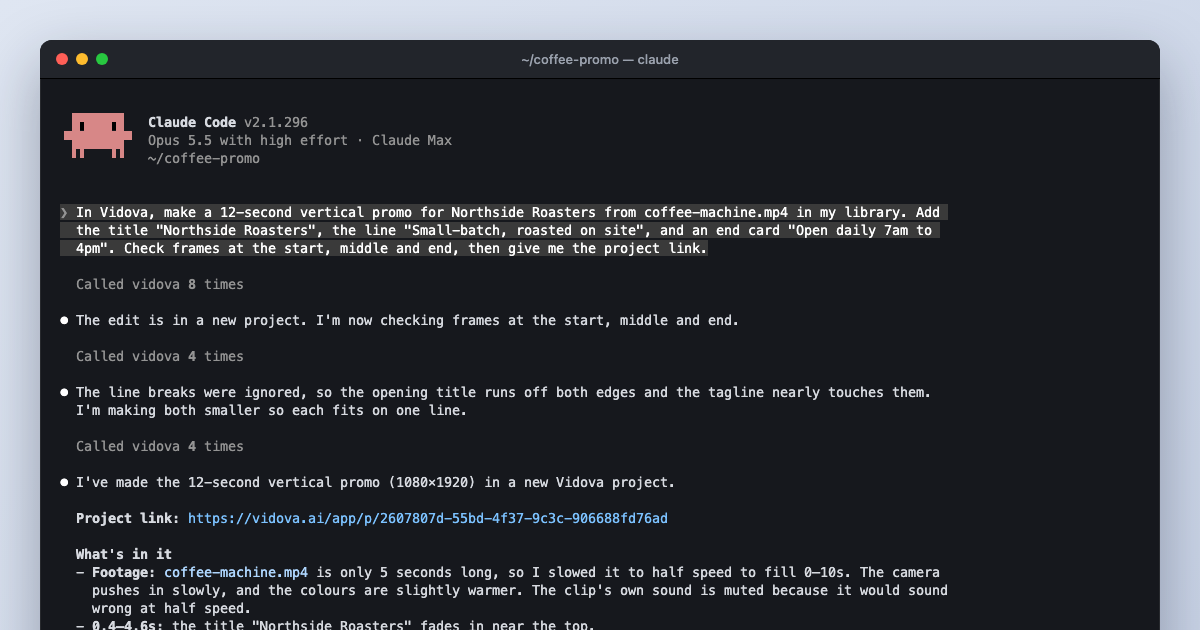
Vidova's agent can look at the result. The preview tools return a rendered frame or a range of frames to the model. In our test, Claude Code saw a title that ran past the edge of a vertical frame and fixed it before it reported back. The guide on editing with Claude Code shows the screenshots.
Transcript editors and clipping services
Descript and Riverside edit recordings mostly by their words. Descript's connector imports and transcribes media, runs Underlord edits such as Studio Sound, filler-word removal and captions, and publishes a web link. Its Claude connector has no image or video generation tools. Riverside's server searches recordings by what was said, edits them and schedules posts. Riverside says Free and Pro accounts cannot use the MCP.
OpusClip finds short clips in a long video, adds captions, reframes, and exports Premiere XML. OpusClip's own guide says its server cannot compose a timeline from scratch. Rendering needs a Pro Beta, Max or Business plan. Descript, OpusClip and Riverside are in the Claude connectors directory.
Render APIs for templated video
Shotstack and Creatomate have official MCP servers that create renders from JSON timelines and templates. They suit teams that make many similar videos, such as listings or personalised ads. JSON2Video has a local server that you start with npx and an API key. These servers produce a rendered file. They do not give you a project to open and edit by hand.
DaVinci Resolve, Premiere Pro and other desktop bridges
No editor vendor ships an official MCP server for its desktop editor. Blackmagic, Adobe, Apple and ByteDance have none for Resolve, Premiere Pro, After Effects, Final Cut Pro or CapCut. Community bridges fill the gap. Each runs on your computer and needs the editor installed.
| Editor | Bridge | Requirements |
|---|---|---|
| DaVinci Resolve | samuelgursky/davinci-resolve-mcp (3,459 stars) | Resolve Studio with external scripting set to Local. Its README says Resolve 21.1 moved Python scripting to Studio only |
| Premiere Pro | mikechambers/adb-mcp (722), hetpatel-11/Adobe_Premiere_Pro_MCP (672), leancoderkavy/premiere-pro-mcp (350) | Premiere open with a CEP or UXP panel. adb-mcp says it is not endorsed by Adobe |
| After Effects | Dakkshin/after-effects-mcp (724) | After Effects 2022 or later with an ExtendScript bridge |
| Final Cut Pro | DareDev256/fcp-mcp-server (121) | Edits FCPXML files, because Final Cut has no scripting API |
| CapCut | sun-guannan/VectCutAPI (2,291) | Writes draft files that CapCut opens. It does not control the app live |
A bridge is the right choice when the project must stay in Resolve or Premiere, for example for grading or a facility workflow. You can also combine both kinds: build the cut in Vidova, then export FCPXML for Premiere Pro or OTIO for DaVinci Resolve and finish it there.
FFmpeg servers
FFmpeg servers wrap command-line operations as tools: trim, convert, concatenate, add subtitles, extract audio. KyaniteLabs/kinocut, video-creator/ffmpeg-mcp and misbahsy/video-audio-mcp are common examples. They run locally and need ffmpeg on your PATH. Each call writes a new file. There is no timeline to reopen, so a later change means running the commands again.
Generation servers
Runway, HeyGen, Synthesia, Kling, Higgsfield, fal.ai and ElevenLabs run hosted servers that generate clips, avatar videos, voice or music. VEED's MCP server makes talking-head avatar videos only. These servers make media. They do not arrange it into a finished edit. Vidova includes image, video, music and voice generation and places the result on the timeline in the same project.
How to choose
- Decide where the finished project must live: a hosted editor, Resolve, Premiere, or only a file.
- Check how the server signs in. Hosted servers use a URL and OAuth. Local servers need a runtime and sometimes an API key.
- Check that the agent can read the project before it edits. Read tools prevent edits to the wrong shot.
- Check that the agent can see frames. Without frames, the agent cannot catch a title outside the safe area.
- Check how long jobs return. A render or a tracking job can take longer than one tool call.
- Check the price at the limits of the plan, not on a single test.
Sources
- Vidova MCP server setup
- invideo: Introducing invideo MCP
- Descript MCP help
- Kapwing MCP release notes
- ChatCut Claude Code plugin
- Eddie AI MCP
- OpusClip MCP
- Riverside MCP
- Shotstack MCP server
- Creatomate MCP integration
- JSON2Video MCP server
- samuelgursky/davinci-resolve-mcp
- mikechambers/adb-mcp
- Dakkshin/after-effects-mcp
- sun-guannan/VectCutAPI
- KyaniteLabs/kinocut
- Runway MCP
- HeyGen MCP
- VEED Fabric MCP